In this fun physical computing activity inspired by the world of Harry Potter, students build and program their own interactive Sorting Hat using a Raspberry Pi, LEDs, a push button, and Python.
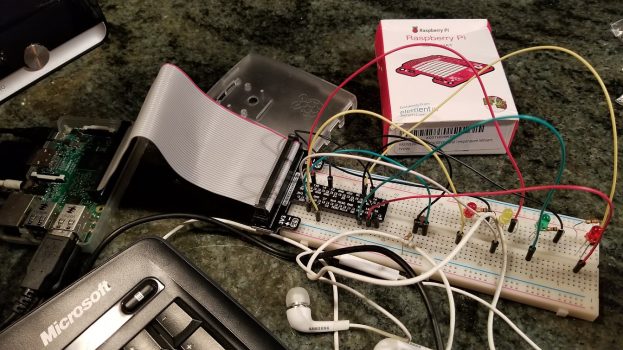
When a participant presses the button, the program randomly selects one of the four Hogwarts houses—Gryffindor, Slytherin, Hufflepuff, or Ravenclaw. Each house is represented by a different LED connected to the Raspberry Pi’s GPIO pins. Once the house is chosen, the corresponding LED blinks, a themed message appears in the console, and a sound effect plays through the speaker, simulating the magical moment when the Sorting Hat announces a student’s house.
Through this project, students learn how to:
Use Python to control hardware with the gpiozero library
Read button input from GPIO pins
Control LED outputs to create visual feedback
Use conditional statements (if/elif) to trigger different actions
Implement random selection using Python’s random module
Play audio files from a Python program
The activity combines coding, electronics, and storytelling, allowing students to experience how software interacts with real-world hardware while creating a playful, interactive system.
This project is ideal for introducing students to physical computing with the Raspberry Pi while reinforcing key programming concepts such as events, randomness, and conditional logic.
import os
from gpiozero import Button, LED
from random import choice
from time import sleep

button = Button(17)
gryffindor = LED(27)
slytherin = LED(6)
hufflepuff = LED(4)
ravenclaw = LED(19)

message = ['Difficult, you are very difficult to sort: ', 'You are a hero, I know which house you belong to: ', 'I sense a darkness in your magic: ', 'When duty calls, you will do your bit for the school: ']

houses = ['Gryffindor','Slytherin','Hufflepuff','Ravenclaw']

music = ['applause.wav', 'WilhelmScream.wav', 'buzzer.wav', 'Scream.wav']

print('Press the button to learn which house you will be joining.')

while True:
    button.wait_for_press()
    house = choice(houses)
    print('Hmmm....let me see.....')
    sleep(2)

if house =='Gryffindor':
    gryffindor.blink(0.2,0.2)
    print(message[0], house)
    play = (music[0])
os.system("aplay {0}".format(play))
    sleep(1)
    gryffindor.off()

elif house == 'Slytherin':
    slytherin.blink(0.2,0.2)
    print(message[2], house)
    play = (music[1])
os.system("aplay {0}".format(play))
    sleep(3)
    slytherin.off()

elif house == 'Hufflepuff':
    hufflepuff.blink(0.2,0.2)
    print(message[3], house)
    play = (music[2])
os.system("aplay {0}".format(play))
    sleep(3)
    hufflepuff.off()

elif house == 'Ravenclaw':
    ravenclaw.blink(0.2,0.2)
    print(message[1], house)
    play = (music[3])
os.system("aplay {0}".format(play))
    sleep(3)
    ravenclaw.off()

print('\n')
print('Who\'s next? Press the button to learn which house you will be joining.')
sleep(0.2)
Want the full classroom experience?
We’re currently building the complete lesson package for this project —
including student worksheets, guided instruction, and grading rubrics.
These materials will be available to premium members soon.