
CodeByte • Variables
Variables in 60 Seconds
Learn how programs store and update information using variables in MakeCode, JavaScript, and Python.
A variable is like a labeled box. It stores information your program can use later. Instead of repeating values over and over, you give the value a name, use it, change it, and show it when needed.
On This Page
- What a variable is
- Predict the output
- MakeCode blocks + Makecode JavaScript
- JavaScript preview + output
- Python preview + output
You’ll Practice
- Setting a variable value
- Showing the value
- Updating the value
- Comparing the same idea in 3 languages
🎯 Predict the Output
Before opening the examples below, predict what this program will show:
let score = 10
basic.showNumber(score)

score = score + 5
basic.showNumber(score)- What number appears first?
- What number appears next?
- Why does the value change?
Now open the sections below to check your prediction.
💻 MakeCode
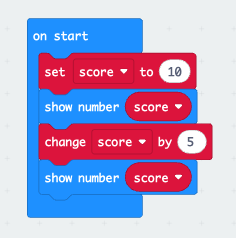
In MakeCode, you can create a variable called score, show it on the screen, then change it by adding 5.
MakeCode Blocks
MakeCode JavaScript
let score = 10
basic.showNumber(score)

score = score + 5
basic.showNumber(score)
Output:
10 → then → 15
🌐 JavaScript Preview
Here’s the same idea in JavaScript. The variable starts at 10, then gets updated by adding 5.
let score = 10;
console.log(score);

score = score + 5;
console.log(score);
Output:
10
15
🐍 Python Preview
Python uses the same basic idea. You create the variable, print it, change it, and print it again.
score = 10
print(score)

score = score + 5
print(score)
Output:
10
15
Why This Matters
Variables are how programs store and update information. Without them, code can’t track scores, remember names, or change values over time.
Everything coming next builds on this. If statements use variables to make decisions, games use variables to track scores and lives, and interactive programs use variables to respond to users.
This is the moment students realize: “The program can remember and change things.”